|
Установка и настройка Apache (Windows)
Скачивание
Для начала необходимо скачать непосредственно сам архив с Apache (https://www.apachelounge.com/download/VC11/). В нашем случае это будет файл httpd-2.4.29-win64-VC11.zip .

Подготовка
Для работы создадим на диске C папку с названием Server. В ней создадим ещё 4 папки: apache( папку где будет установлен наш сервер), log (папка куда apache будет записывать логги), php (папка, в которую дальнейшем мы "установим" php), www (папка, в которой будут храниться файлы наших сайтов).
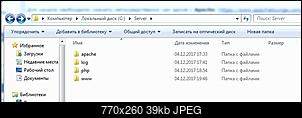
Для дальнейшей установки веб-сервера нужно добавить путь в системную переменную PATH. В нашем случае путь выглядит:;C:\Server\apache\.

Установка
Из загруженного архива распаковываем содержимое папки Apache24 в C:\Server\apache.
С помощью любого текстового редактора открываем файл С:\Server\apache\conf\httpd.conf. httpd.conf - это файл конфигурации сервера. Его необходимо настроить соответствующим образом(обратим внимание на самые главные моменты).- ServerName. В этой строке должно стоять официальное имя вашего сервера в том виде, в котором оно появляется в строке URL (то есть http://www.ИMЯ_вaшeго_сервера/). Это должно быть имя компьютера, зарегистрированное в системе имен серверов вашей организации или провайдера. В нашем случае указан локальный сервер:
ServerName localhost:80
- ServerType. Для этой директивы значением по умолчанию является ServerType standalone. Серверы, работающие в автономном режиме (standalone), запускаются из загрузочных сценариев при запуске системы. Такая установка рекомендуется для улучшения производительности. В нашем случае оставляем как есть.
- ServerAdmin. Это официальный электронный адрес вебмастера вашего Web-узла. Обычно используется адрес в форме WebMaster@ваш_cepвep, где ваш_сервер является хорошо известным именем вашего сервера. При этом адрес останется неизменным, даже если сменится вебмастер. У нас
ServerAdmin [email]admin@example.com[/email].
- ServerRoot. В этой директиве задается базовый каталог, в котором будет установлено программное обеспечение HTTP-сервера Apache. В нашем случае:
ServerRoot "C:/Server/apache"
- DocumentRoot. В этой директиве задается каталог, из которого берутся передаваемые клиентам документы. В нашем случае:
DocumentRoot "C:/Server/www"
- Directory. Сервер Apache предоставляет широкий выбор возможностей, позволяющих сделать сопровождение сервера более удобным; некоторые из них находят применение в обеспечении защиты информации на вашем Web-узле. Файл доступа к серверу (/usr/local/etc/httpd/conf/access.conf) позволяет включать либо выключать такие возможности на уровне отдельных каталогов.
Кроме того, этот файл используется для ограничения доступа к вашему серверу некоторых пользователей и компьютеров. . На данном этапе мы произведем лишь минимальную их настройку, необходимую для работы сервера.
Откройте в редакторе файл access.conf. Входящая в поставку копия файла access, conf предоставляет три варианта описания доступа: один для каталога cgi-bin, другой для каталога документов, а третий демонстрирует некоторые возможности управления доступом к различным каталогам.
Первое описание позволяет управлять каталогом сценариев CGI. Обратите внимание, что в файле используется синтаксис языка HTML, в котором тег <Directory /usr/local/etc/httpd/cgi-bin> отмечает начало секции с описанием опций для используемого сервером по умолчанию каталога cgi-bin. Эту секцию закрывает тег </Directory>.
Вторая директива должна выглядеть следующим образом:
<Directory /usr/local/etc/httpd/htdocs>
В нашем случае: <Directory "C:/Server/www">...</Directory>
- ErrorLog и CustomLog. Apache записывает информацию об ошибках и о том с какого устройства и когда были запросы к серверу, сохраняя всю информацию в специальные файлы: лог ошибок и лог доступах. Чтобы эти файлы находились в специально отведенной для этого папке, мы внесем следующие изменения:
ErrorLog "C:/Server/log/apache-error.log"
CustomLog "C:/Server/log/apache-access.log" common
- LoadModule . Различные подключаемые модули. В нашем случае:
LoadModule php5_module "C:/Server/php/php5apache2_2.dll" - для поддержки php файлов.
Сам файл php5apache2_2.dll у нас будет в папке php, подключением которого займёмся чуть позже.

Больше информации о различных пунктах, которые можно настраивать ( таких как количество клиентов на сервере, таймауты и тд) можно найти здесь - http://www.opennet.ru/docs/RUS/apache/
Далее, для того что бы сервер мог корректно работать с php файлами необходимо, в этом же файле, дописать несколько сток:
В строке <ifmodule mime_module> и в конце этого блока перед строкой </ifmodule> добавить:
AddType application/x-httpd-php .php

AddType application/x-httpd-php-source .phps
А в строке DirectoryIndex index.html дописать index.php. В итоге получим строку DirectoryIndex index.html index.php
Для работы с python-файлами необходимо следующее:
В Options Indexes FollowSymLinks дописать ExecCGI(разрешается выполнение сценариев CGI). Options Indexes FollowSymLinks ExecCGI.
Раскомментировать строчку AddHandler cgi-script .cgi .py
После всего этого в командной строке пишем C:\Server\apache\bin\httpd.exe -k install - для установки веб-сервера, согласно нашим настройкам(файл httpd.conf). Для удаления, если нужно, используем команду C:\Server\apache\bin\httpd.exe -k uninstall , так же в командной строке.
Для удобство прилепляю пример отредактированного httpd.conf файла (# - начало комментария в файле):
Кликните здесь для просмотра всего текста
httpd.conf
# This is the main Apache HTTP server configuration file.  It contains the

# configuration directives that give the server its instructions.

# See <URL:http://httpd.apache.org/docs/2.2> for detailed information.

# In particular, see

# <URL:http://httpd.apache.org/docs/2.2/mod/directives.html>

# for a discussion of each configuration directive.

#

# Do NOT simply read the instructions in here without understanding

# what they do.  They're here only as hints or reminders.  If you are unsure

# consult the online docs. You have been warned.

#

# Configuration and logfile names: If the filenames you specify for many

# of the server's control files begin with "/" (or "drive:/" for Win32), the

# server will use that explicit path.  If the filenames do *not* begin

# with "/", the value of ServerRoot is prepended -- so 'log/access_log'

# with ServerRoot set to '/www' will be interpreted by the

# server as '/www/log/access_log', where as '/log/access_log' will be

# interpreted as '/log/access_log'.

#

# NOTE: Where filenames are specified, you must use forward slashes

# instead of backslashes (e.g., "c:/apache" instead of "c:\apache").

# If a drive letter is omitted, the drive on which httpd.exe is located

# will be used by default.  It is recommended that you always supply

# an explicit drive letter in absolute paths to avoid confusion.


#

# ServerRoot: The top of the directory tree under which the server's

# configuration, error, and log files are kept.

#

# Do not add a slash at the end of the directory path.  If you point

# ServerRoot at a non-local disk, be sure to point the LockFile directive

# at a local disk.  If you wish to share the same ServerRoot for multiple

# httpd daemons, you will need to change at least LockFile and PidFile.

#

ServerRoot "C:/Server/apache"


#

# Listen: Allows you to bind Apache to specific IP addresses and/or

# ports, instead of the default. See also the <VirtualHost>

# directive.

#

# Change this to Listen on specific IP addresses as shown below to

# prevent Apache from glomming onto all bound IP addresses.

#

#Listen 12.34.56.78:80

Listen 80


#

# Dynamic Shared Object (DSO) Support

#

# To be able to use the functionality of a module which was built as a DSO you

# have to place corresponding `LoadModule' lines at this location so the

# directives contained in it are actually available _before_ they are used.

# Statically compiled modules (those listed by `httpd -l') do not need

# to be loaded here.

#

# Example:

# LoadModule foo_module modules/mod_foo.so

#

LoadModule actions_module modules/mod_actions.so

LoadModule alias_module modules/mod_alias.so

LoadModule asis_module modules/mod_asis.so

LoadModule auth_basic_module modules/mod_auth_basic.so

#LoadModule auth_digest_module modules/mod_auth_digest.so

#LoadModule authn_alias_module modules/mod_authn_alias.so

#LoadModule authn_anon_module modules/mod_authn_anon.so

#LoadModule authn_dbd_module modules/mod_authn_dbd.so

#LoadModule authn_dbm_module modules/mod_authn_dbm.so

LoadModule authn_default_module modules/mod_authn_default.so

LoadModule authn_file_module modules/mod_authn_file.so

#LoadModule authnz_ldap_module modules/mod_authnz_ldap.so

#LoadModule authz_dbm_module modules/mod_authz_dbm.so

LoadModule authz_default_module modules/mod_authz_default.so

LoadModule authz_groupfile_module modules/mod_authz_groupfile.so

LoadModule authz_host_module modules/mod_authz_host.so

#LoadModule authz_owner_module modules/mod_authz_owner.so

LoadModule authz_user_module modules/mod_authz_user.so

LoadModule autoindex_module modules/mod_autoindex.so

#LoadModule cache_module modules/mod_cache.so

#LoadModule cern_meta_module modules/mod_cern_meta.so

LoadModule cgi_module modules/mod_cgi.so

#LoadModule charset_lite_module modules/mod_charset_lite.so

#LoadModule dav_module modules/mod_dav.so

#LoadModule dav_fs_module modules/mod_dav_fs.so

#LoadModule dav_lock_module modules/mod_dav_lock.so

#LoadModule dbd_module modules/mod_dbd.so

#LoadModule deflate_module modules/mod_deflate.so

LoadModule dir_module modules/mod_dir.so

#LoadModule disk_cache_module modules/mod_disk_cache.so

#LoadModule dumpio_module modules/mod_dumpio.so

LoadModule env_module modules/mod_env.so

#LoadModule expires_module modules/mod_expires.so

#LoadModule ext_filter_module modules/mod_ext_filter.so

#LoadModule file_cache_module modules/mod_file_cache.so

#LoadModule filter_module modules/mod_filter.so

#LoadModule headers_module modules/mod_headers.so

#LoadModule ident_module modules/mod_ident.so

#LoadModule imagemap_module modules/mod_imagemap.so

LoadModule include_module modules/mod_include.so

#LoadModule info_module modules/mod_info.so

LoadModule isapi_module modules/mod_isapi.so

#LoadModule ldap_module modules/mod_ldap.so

#LoadModule logio_module modules/mod_logio.so

LoadModule log_config_module modules/mod_log_config.so

#LoadModule log_forensic_module modules/mod_log_forensic.so

#LoadModule mem_cache_module modules/mod_mem_cache.so

LoadModule mime_module modules/mod_mime.so

#LoadModule mime_magic_module modules/mod_mime_magic.so

LoadModule negotiation_module modules/mod_negotiation.so

#LoadModule proxy_module modules/mod_proxy.so

#LoadModule proxy_ajp_module modules/mod_proxy_ajp.so

#LoadModule proxy_balancer_module modules/mod_proxy_balancer.so

#LoadModule proxy_connect_module modules/mod_proxy_connect.so

#LoadModule proxy_ftp_module modules/mod_proxy_ftp.so

#LoadModule proxy_http_module modules/mod_proxy_http.so

#LoadModule proxy_scgi_module modules/mod_proxy_scgi.so

#LoadModule reqtimeout_module modules/mod_reqtimeout.so

#LoadModule rewrite_module modules/mod_rewrite.so

LoadModule setenvif_module modules/mod_setenvif.so

#LoadModule speling_module modules/mod_speling.so

#LoadModule ssl_module modules/mod_ssl.so

#LoadModule status_module modules/mod_status.so

#LoadModule substitute_module modules/mod_substitute.so

#LoadModule unique_id_module modules/mod_unique_id.so

#LoadModule userdir_module modules/mod_userdir.so

#LoadModule usertrack_module modules/mod_usertrack.so

#LoadModule version_module modules/mod_version.so

#LoadModule vhost_alias_module modules/mod_vhost_alias.so

LoadModule php5_module "C:/Server/php/php5apache2_2.dll"

AddHandler cgi-script .py

<IfModule !mpm_netware_module>

<IfModule !mpm_winnt_module>

#

# If you wish httpd to run as a different user or group, you must run

# httpd as root initially and it will switch.

#

# User/Group: The name (or #number) of the user/group to run httpd as.

# It is usually good practice to create a dedicated user and group for

# running httpd, as with most system services.

#

User daemon

Group daemon


</IfModule>

</IfModule>


# 'Main' server configuration

#

# The directives in this section set up the values used by the 'main'

# server, which responds to any requests that aren't handled by a

# <VirtualHost> definition.  These values also provide defaults for

# any <VirtualHost> containers you may define later in the file.

#

# All of these directives may appear inside <VirtualHost> containers,

# in which case these default settings will be overridden for the

# virtual host being defined.

#


#

# ServerAdmin: Your address, where problems with the server should be

# e-mailed.  This address appears on some server-generated pages, such

# as error documents.  e.g. [email]admin@your-domain.com[/email]

#

ServerAdmin [email]admin@example.com[/email]


#

# ServerName gives the name and port that the server uses to identify itself.

# This can often be determined automatically, but we recommend you specify

# it explicitly to prevent problems during startup.

#

# If your host doesn't have a registered DNS name, enter its IP address here.

#

ServerName localhost:80


#

# DocumentRoot: The directory out of which you will serve your

# documents. By default, all requests are taken from this directory, but

# symbolic links and aliases may be used to point to other locations.

#

DocumentRoot "C:/Server/www"


#

# Each directory to which Apache has access can be configured with respect

# to which services and features are allowed and/or disabled in that

# directory (and its subdirectories).

#

# First, we configure the "default" to be a very restrictive set of

# features.

#

<Directory />

    Options FollowSymLinks

    AllowOverride None

    Order deny,allow

    Deny from all

</Directory>


#

# Note that from this point forward you must specifically allow

# particular features to be enabled - so if something's not working as

# you might expect, make sure that you have specifically enabled it

# below.

#


#

# This should be changed to whatever you set DocumentRoot to.

#

<Directory "C:/Server/www">

    #

    # Possible values for the Options directive are "None", "All",

    # or any combination of:

    #   Indexes Includes FollowSymLinks SymLinksifOwnerMatch ExecCGI MultiViews

    #

    # Note that "MultiViews" must be named *explicitly* --- "Options All"

    # doesn't give it to you.

    #

    # The Options directive is both complicated and important.  Please see

    # [url]http://httpd.apache.org/docs/2.2/mod/core.html#options[/url]

    # for more information.

    #

    Options Indexes FollowSymLinks ExecCGI


    #

    # AllowOverride controls what directives may be placed in .htaccess files.

    # It can be "All", "None", or any combination of the keywords:

    #   Options FileInfo AuthConfig Limit

    #

    AllowOverride None


    #

    # Controls who can get stuff from this server.

    #

    Order allow,deny

    Allow from all


</Directory>


#

# DirectoryIndex: sets the file that Apache will serve if a directory

# is requested.

#

<IfModule dir_module>

    DirectoryIndex index.html index.php index.py

</IfModule>


#

# The following lines prevent .htaccess and .htpasswd files from being

# viewed by Web clients.

#

<FilesMatch "^\.ht">

    Order allow,deny

    Deny from all

    Satisfy All

</FilesMatch>


#

# ErrorLog: The location of the error log file.

# If you do not specify an ErrorLog directive within a <VirtualHost>

# container, error messages relating to that virtual host will be

# logged here.  If you *do* define an error logfile for a <VirtualHost>

# container, that host's errors will be logged there and not here.

#

ErrorLog "C:/Server/log/apache-error.log"


#

# LogLevel: Control the number of messages logged to the error_log.

# Possible values include: debug, info, notice, warn, error, crit,

# alert, emerg.

#

LogLevel warn


<IfModule log_config_module>

    #

    # The following directives define some format nicknames for use with

    # a CustomLog directive (see below).

    #

    LogFormat "%h %l %u %t "%r" %>s %b "%{Referer}i" "%{User-Agent}i"" combined

    LogFormat "%h %l %u %t "%r" %>s %b" common


    <IfModule logio_module>

      # You need to enable mod_logio.c to use %I and %O

      LogFormat "%h %l %u %t "%r" %>s %b "%{Referer}i" "%{User-Agent}i" %I %O" combinedio

    </IfModule>


    #

    # The location and format of the access logfile (Common Logfile Format).

    # If you do not define any access logfiles within a <VirtualHost>

    # container, they will be logged here.  Contrariwise, if you *do*

    # define per-<VirtualHost> access logfiles, transactions will be

    # logged therein and *not* in this file.

    #

    CustomLog "C:/Server/log/apache-access.log" common


    #

    # If you prefer a logfile with access, agent, and referer information

    # (Combined Logfile Format) you can use the following directive.

    #

    #CustomLog "logs/access.log" combined

</IfModule>


<IfModule alias_module>

    #

    # Redirect: Allows you to tell clients about documents that used to

    # exist in your server's namespace, but do not anymore. The client

    # will make a new request for the document at its new location.

    # Example:

    # Redirect permanent /foo [url]http://www.example.com/bar[/url]


    #

    # Alias: Maps web paths into filesystem paths and is used to

    # access content that does not live under the DocumentRoot.

    # Example:

    # Alias /webpath /full/filesystem/path

    #

    # If you include a trailing / on /webpath then the server will

    # require it to be present in the URL.  You will also likely

    # need to provide a <Directory> section to allow access to

    # the filesystem path.


    #

    # ScriptAlias: This controls which directories contain server scripts.

    # ScriptAliases are essentially the same as Aliases, except that

    # documents in the target directory are treated as applications and

    # run by the server when requested rather than as documents sent to the

    # client.  The same rules about trailing "/" apply to ScriptAlias

    # directives as to Alias.

    #

    ScriptAlias /cgi-bin/ "c:/Apache2/cgi-bin/"


</IfModule>


<IfModule cgid_module>

    #

    # ScriptSock: On threaded servers, designate the path to the UNIX

    # socket used to communicate with the CGI daemon of mod_cgid.

    #

    #Scriptsock logs/cgisock

</IfModule>


#

# "c:/Apache2/cgi-bin" should be changed to whatever your ScriptAliased

# CGI directory exists, if you have that configured.

#

<Directory "C:/Apache2/cgi-bin">

    AllowOverride None

    Options None

    Order allow,deny

    Allow from all

</Directory>


#

# DefaultType: the default MIME type the server will use for a document

# if it cannot otherwise determine one, such as from filename extensions.

# If your server contains mostly text or HTML documents, "text/plain" is

# a good value.  If most of your content is binary, such as applications

# or images, you may want to use "application/octet-stream" instead to

# keep browsers from trying to display binary files as though they are

# text.

#

DefaultType text/plain


<IfModule headers_module>

    #

    # Avoid passing HTTP_PROXY environment to CGI's on this or any proxied

    # backend servers which have lingering "httpoxy" defects.

    # 'Proxy' request header is undefined by the IETF, not listed by IANA

    #

    RequestHeader unset Proxy early

</IfModule>


<IfModule mime_module>

    #

    # TypesConfig points to the file containing the list of mappings from

    # filename extension to MIME-type.

    #

    TypesConfig conf/mime.types


    #

    # AddType allows you to add to or override the MIME configuration

    # file specified in TypesConfig for specific file types.

    #

    #AddType application/x-gzip .tgz

    #

    # AddEncoding allows you to have certain browsers uncompress

    # information on the fly. Note: Not all browsers support this.

    #

    #AddEncoding x-compress .Z

    #AddEncoding x-gzip .gz .tgz

    #

    # If the AddEncoding directives above are commented-out, then you

    # probably should define those extensions to indicate media types:

    #

    AddType application/x-compress .Z

    AddType application/x-gzip .gz .tgz


    #

    # AddHandler allows you to map certain file extensions to "handlers":

    # actions unrelated to filetype. These can be either built into the server

    # or added with the Action directive (see below)

    #

    # To use CGI scripts outside of ScriptAliased directories:

    # (You will also need to add "ExecCGI" to the "Options" directive.)

    #

    AddHandler cgi-script .cgi .py


    # For type maps (negotiated resources):

    #AddHandler type-map var


    #

    # Filters allow you to process content before it is sent to the client.

    #

    # To parse .shtml files for server-side includes (SSI):

    # (You will also need to add "Includes" to the "Options" directive.)

    #

    #AddType text/html .shtml

    #AddOutputFilter INCLUDES .shtml

	AddType application/x-httpd-php .php

    AddType application/x-httpd-php-source .phps

</IfModule>


#

# The mod_mime_magic module allows the server to use various hints from the

# contents of the file itself to determine its type.  The MIMEMagicFile

# directive tells the module where the hint definitions are located.

#

#MIMEMagicFile conf/magic


#

# Customizable error responses come in three flavors:

# 1) plain text 2) local redirects 3) external redirects

#

# Some examples:

#ErrorDocument 500 "The server made a boo boo."

#ErrorDocument 404 /missing.html

#ErrorDocument 404 "/cgi-bin/missing_handler.pl"

#ErrorDocument 402 [url]http://www.example.com/subscription_info.html[/url]

#


#

# MaxRanges: Maximum number of Ranges in a request before

# returning the entire resource, or one of the special

# values 'default', 'none' or 'unlimited'.

# Default setting is to accept 200 Ranges.

#MaxRanges unlimited


#

# EnableMMAP and EnableSendfile: On systems that support it,

# memory-mapping or the sendfile syscall is used to deliver

# files.  This usually improves server performance, but must

# be turned off when serving from networked-mounted

# filesystems or if support for these functions is otherwise

# broken on your system.

#

#EnableMMAP off

#EnableSendfile off


# Supplemental configuration

#

# The configuration files in the conf/extra/ directory can be

# included to add extra features or to modify the default configuration of

# the server, or you may simply copy their contents here and change as

# necessary.


# Server-pool management (MPM specific)

#Include conf/extra/httpd-mpm.conf


# Multi-language error messages

#Include conf/extra/httpd-multilang-errordoc.conf


# Fancy directory listings

#Include conf/extra/httpd-autoindex.conf


# Language settings

#Include conf/extra/httpd-languages.conf


# User home directories

#Include conf/extra/httpd-userdir.conf


# Real-time info on requests and configuration

#Include conf/extra/httpd-info.conf


# Virtual hosts

#Include conf/extra/httpd-vhosts.conf


# Local access to the Apache HTTP Server Manual

#Include conf/extra/httpd-manual.conf


# Distributed authoring and versioning (WebDAV)

#Include conf/extra/httpd-dav.conf


# Various default settings

#Include conf/extra/httpd-default.conf


# Secure (SSL/TLS) connections

#Include conf/extra/httpd-ssl.conf

#

# Note: The following must must be present to support

#       starting without SSL on platforms with no /dev/random equivalent

#       but a statically compiled-in mod_ssl.

#

<IfModule ssl_module>

SSLRandomSeed startup builtin

SSLRandomSeed connect builtin

</IfModule>
Примечание
В более новых версия Apache в conf-файле вместо Order dany, allow надо писать Require all denied или Require all granted. Кроме того возможны и другие изменения. См. в логах консоли после команды install.
Настройка PHP
На сайте www.anindya.com/tag/php скачиваем архив php последней версии. После того как архив скачался, открываем его и переносим содержимое в папку C:\Server\php\.
Создадим две пустые папки «tmp» и «upload».
В скопированной папке находим файл «php.ini-development» и меняем расширение на «php.ini». Открываем файл в любом текстовом редакторе и изменяем только приведённые ниже директивы:
Кликните здесь для просмотра всего текста
| Code | 1
2
3
4
5
6
7
8
9
10
11
12
13
14
15
16
17
18
19
20
21
22
23
24
25
26
27
28
29
30
31
32
33
34
35
| short_open_tag = On
zlib.output_compression = On
post_max_size = 64M
include_path = ".;С:\Server\php\includes"
extension_dir = "C:/Server/php/ext"
upload_tmp_dir = "C:/Server/php/upload"
upload_max_filesize = 64M
extension=php_bz2.dll
extension=php_curl.dll
extension=php_gd2.dll
extension=php_mbstring.dll
extension=php_mysql.dll
extension=php_mysqli.dll
extension=php_pdo_mysql.dll
extension=php_sockets.dll
extension=php_sqlite3.dll
date.timezone = "Europe/Moscow"
session.save_path = "С:/Server/php/tmp/" |
|
Запуск
Для запуска переходим в папку С:\Server\apache\bin\ и запускаем файл ApacheMonitor.exe.
После чего в трее появится ярлык сервера Apache, жмем на него левой кнопкой мыши и видим контекстное меню управления веб-сервером (Star, Stop, Restart).
Поместим любой html-файл в C:\Server\www.
Нажимаем Start в контекстном меню управления сервером, если всё установленный успешно, то набрав в браузере http://localhost. Там должен отобразиться помещённый в папку www html-файл.
После завершения установки желательно перезагрузить компьютер.
|

 Пример python файла. После символа # необходимо указать путь до python


